Thursday, June 9, 2016

15 Best Presentation Software/Platforms

15 Best Presentation Software/Platforms
Presentation  Software/Platforms is a package that used to display information in the form of a slide show. It has three major functions: an editor that allows text to be inserted and formatted, a method for inserting and manipulating graphic images, and a slide-show system to display the content. Presentation software enables the students, presentation writer, business managers, reporters to present their story and idea in a more comprehensive way. Presenting views/ideas in shape of graphical interface is much powerful as compare to presenting them written format or in shape of speech. In this article we present 15 best presentation software and platforms that are suitable for all kinds of businesses and professionals. Read more:

15 Best Presentation Software/Platforms

1. PowerPoint 
PowerPoint is a slideshow presentation program developed by Microsoft. It is available in desktop version and web based as well. PowerPoint is useful for helping develop the slide based presentation format, and is currently one of the most commonly used presentation programs available. PowerPoint is built-in with three types of presentation movements namely: entrance emphasis and exists elements; transitions for movement between slides; and custom animation used to create small storyboards. And there is a lots of template is available for download on web too.

2. Academic Presenter
Academic Presenter lets the users to create huge graphs like hierarchical and vector based presentations by using the various levels and tools available in software. This software is totally free and enables the users to represents very huge graphs in addition to simple image, audios, and videos. This software contains two parts, first it is handy parts that contains simple tools for making graphs and frames in a minute. Second part is about animation tools that enables the users to create effulgence transitions in camera and elements for representing different parts in their presentation.

3. Google Slides 
Google Slides is a presentation program offered by Google within its Google Drive service. Google Slides is a free platform that allows you to present your ideas in a shiny way with a variety of presentation themes, thousands of fonts, embedded video, animations, and more and all are free. Anyone using Google Slides can create, edit, collaborate, and present in a comprehensive and well looking way. Everyone can work together in the same presentation at the same time and can edit it in real time and share with anyone present your stories and presentation easily.

4. Prezi 
Prezi is a cloud-based presentation tool that allows the professionals & reporter to present the presentation from the browser, desktop, iPad, iPhone, or Android device and always present the up to date version of their work. You can get started with professionally designed templates and find inspiration and content you can use from massive library of Prezi. Attract your audience by highlighting your story. Visually explain others about what you are thinking and how ideas relate to each other and use images, videos, and text to enhance your presentation.

5. Haiku Deck  
Haiku Deck is an all-in-one presentation software that enables you to tell your story in a simple & beautiful way. Whether you want to present business idea or a photo slideshow for your website/blog or a manifesto, it is best for all. There are no designs and skills are required to use Haiku Deck. It is built-in with thousands of themes and templates. After creating presentation, you can share it on social media channels via Facebook, Twitter or can email them on any web enabled device.

6. Keynote 
Keynote is a presentation application that is the part of iWork productivity suite. Keynote is developed by the Apple Inc. for Max OS X operating systems. Keynote is a presentation making application for Mac OS X users and lets the users create and present beautiful and stunning presentation. Keynote is integrated with a lot of presentations and effects tools that brings the visual ideas in a soft life.

7. FreeOffice 
FreeOffice is a free program that use for creating the creative presentation. FreeOffice is a multi-platform program that is available for Windows, Linux, and Android mobile operating systems. It is free for use for both home and business purposes. Most of the people considered it a software that can be used instead of Microsoft Office as well as it employs the TextMaker, PlanMaker, and Presentations.

8.  LaTeX 
LaTeX is an application for creating slides for presentations. LaTeX is a presentation making program that supports the both LaTeX-dvips and pdflatex. LaTeX has special syntax for reshaping slides. LaTeX is available for Windows and Unix-based operating systems. Among a lot of available packages it is one of the best presentation making applications that is used for creating the professional and high level of presentations.

9. SlideDog 
SlideDog is a multimedia presentation application that gives the freedom to users to present whatever they want in a professional to create an impact over the audience. Time to using traditional slide creator has gone away. Now it is the era of SlideDog for creating seamless presentations. SlideDog is such an advanced application that lets its users combine any media into one multimedia presentation.

10. WPS Office 
WPS Office stands for Writer, Presentation and Spreadsheet Office. WPS Office is an application for the Windows, Linux, iOS and Android operating systems for creating stunning presentations. As apparent from its name, writer, presentation, and spreadsheet, WPS Office is such a great application that can be used for any purpose.

11. Libre Office Impress 
Libre Office Impress is a fully-featured application of the LibreOffice for creating stunning and amazing multimedia presentations. LibreOffice Impress is actually the part of the open source office suite of the LibreOffice that is developed and produced by The Document Foundation. For those presenters who are looking for a free & open-source presentation maker are suggested to use the LibreOffice Impress for creating the effective and impressive multimedia presentations.

12. Zoho Office Suite 
Zoho Office Suite is an open source web-based application whose most features are available for free. It is a basically a web based office suite and SaaS application for presentations making. Zoho Office Suite is basically integrated with the powers of performing word processing, spreadsheets, databases, note-taking, web conferencing, CRM, project management, invoicing and various other tools.

13. MediaShout 
MediaShout lets the users create and present the ministry messages to the audience. The newer version of MediaShout is integrated with a lot of advanced and high-tech features. The main features and functions of MediaShout are multiple objects per slide, announcement deck & manager, stage mirroring, etc.

14. Kingsoft Office Presentation 
Kingsoft Office Presentation is a free presentation maker that is regarded as the competitor of MS Office PowerPoint. Kingsoft Office Presentation is the part of Kingsoft Office Suite. This tool is capable in building impressive presentation slideshow with rich features and elements. Kingsoft Office Presentation lets the users to easily and quickly create professional and dynamic presentations and slideshows through its user-friendly features.

15. Apache Open Office 
Apache OpenOffice is the chief open-source office software package for word processing, spreadsheets, presentations, graphics, databases. The suite comprises a Writer which helps users in composing, editing, formatting, and sometimes printing of any type of written material; Impress that is employed to display information in the form of a slide show with three supreme functions.

So which one you use & which one you are going to use don't forget to mention :)

30 Best Website Analytics sites/services

30 Best Website Analytics sites/services
Web analytic is the measurement, collection, analysis and reporting of web data for purposes of understanding and optimizing website/webpage usage. Web analytic is not only for measuring web traffic but also can be used as a tool for business and market research & to assess and improve the effectiveness of a website. Web analytic applications can help companies to measure the results of traditional print/broadcast advertising campaigns. It helps one to estimate how traffic to a website changes after the launch of a new advertising campaign. It provides information about the number of visitors to a website and the number of page views. It helps gauge traffic and popularity trends which is useful for market research. Here in this article Top 30 Best Website Analytic sites/services listed. Read on:

30 Best Website Analytics sites/services

1. Google Analytics
Google Analytics is the best freemium Web Analytics service, which provides statistic for website owners, who are using Google Adword, Google AdSense and Google Webmaster tools. With the help of this tool, web owner can access the data on their website regarding visitor location, time spent on site, page visited, monitoring system, browser used, Internet speed of visitor, etc. Only limitation of Google Analytics a very limited analytic and visitors tracking platform. Google Analytics will make you able to get better insight of your website about how it is performing. You can get result across all of your websites, apps and even offline channels as well. It will make you able to get the behavior of your visitors in real time. Among a lot of features and advantages the major one of Google Analytics are that it will assist you in improving your engagement.

2. Clicky
Clicky is a web analytic tool, which provides the real time data of the visitors. Everything which you think necessary for web marketing will be surely available on this platform. Clicky allows you see individual visitor and every action they perform on your site, their usernames and email addresses. The main dashboard includes a variety of website stats that can be customized based on date, offers a link report that shows all external websites sending traffic to you. It offers an actions metric that measures all visitor actions like video views and downloads by the user Heatmaps feature is a unique feature of the Clicky, which provides you the data of those visitors who completed a specific session. Clicky offers search data which provides a list of incoming search keywords and also shows the ranking for those keywords.

3. Open Web Analytics
Open Web Analytics is a downloadable application and is essentially the open source, It is self-hosted, and for wordpress users there is a plugin available. This free tool can be used to track more than one website. For a free tool, Open Web Analytics is filled with features. It offers stat filters and heat maps. This platform is specialized in delivering those analytical tools that will make you able to track and analyze the activities of your visitors on your websites and even applications. Open Web Analytic is a multi-functional analytic tool that you can use to track multiple sites.

4. KISS metrics
KISS metrics is a customer intelligence and web analytics service, which connects all your data to real people. If you are using multiple devices and browsers then it will also connect all your data to a single person in KISS metrics. You will check everything that visitor has done from the initial stage to the last & With its data funnel feature, it helps you find your site’s weakest point/step that might be costing you conversions. It will provide you accurate data of real people by which you will be able to optimize your site ASAP.

5. Ptengine
Ptengine is a web analytic and heat map tool for the webmaster and digital market managers to view how their website is doing on internet world. If you want a simple and easy to use web analytic platform that make you able to view the performance of your website in a user friendly display environment then Ptengine is among simple yet powerful web analytic platform.

6. Fox Metrics
Fox Metrics web analysis tool will allow you to specifically use metrics that your business requires. It offers four key features: Funnels which help you identify the points at which users drop an action and so that you can fix them up for maximum profits; Segments which help segregate website traffic into categories and Triggers which are actions, on the basis of which you can assign a reaction. It allows you to track events such as software installations and newsletter views. It helps measure conversion rates and improve them. With this you can measure success of an ad campaign by tracking conversions through it.  

7. Piwik
Piwik is a free & open-source web analytics tool that provides detailed reports on your website regarding its visitors, search engine used, keywords used, page visited, files downloaded and many more. Apart from report system, its users can save notes and attach them to any previous date. Its multiple features such as transitions, goals, e-commerce, page overlay, row evolution and custom variables gives the users best way of organizing.

8. Mint
Mint is an extensible, self-hosted web site analytics program. Its interface is an exercise in simplicity. Visits, referrers, popular pages and searches can all be taken in at a glance on Mint's flexible dashboard. Mint is comparable to Google Analytics in terms of the kinds of data it collects. It tracks all basic statistics like referrals, searches, popular pages and traffic trends. Displays the total page views along with unique visitors. The referrer information is divided into the most recent, the newest one and the repeat referrers. Mint has a nice interface. One time cost, instead of a recurring subscription. Its can be customizable which is pretty good, if you are savvy with website tools.

9. Woopra
Woopra is a commercial real time customer analytics service for marketing. The tool is designed to assist organization optimize the customer behavior by providing data of individual website visitors and aggregate analytics reports of all visitors. Besides giving reports, it provides a comprehensive profile for every single user in 100% real time. Reporting like segmentation, funnels, retention and much more are the part of its features.

10. GoSquared
GoSquared is a software to grow your business. It is real-time web analytics, live chat and customer relationship management software integrated seamlessly. GoSquared has actionable metrics that is essential for e-commerce websites. It is a great tool that measures visitor engagement. With its real time reporting system, It notifies you of traffic spikes, social trends and it calculates this data more efficiently than Google Analytics. It has a very user-friendly interface, with widgets that you can customize based on your requirement.   

11. Mixpanel
Mixpanel is a business analytics service and company. It tracks user interactions with web and mobile applications and offers tools for targeted communication with them. Its toolset contains in-app A/B tests and user survey forms. Collected data is used to build custom reports and measure user engagement and retention. Mixpanel works with web applications, in particular SaaS, but also supports mobile apps. As of April 2013, Mixpanel claimed to track 48 billion actions per month for its customers.

12. StatCounter 
StatCounter is a free web based invisible web tracker and web traffic monitoring platform that displays the number of new and returning visitors on your website in real-time. Embedding the script of StatCounter is very easy and creating an account with StatCounter is simple too. One of the biggest advantages of using for checking the hit counter is that it is a highly configurable web tracker.

13. Chartbeat 
Chartbeat is a business analytics tool. It is focused primarily on real-time data and real time analytics. It has a robust dashboard, iPhone app and email alerts notifies you immediately of any server crash, or traffic spikes. Chartbeat it is all about knowing your audience. It tells you if they are reading, sitting idle and even how far down they are into the page, it also tells you how people are engaging with your content. Gives detailed insights as to how users are sharing your content. 

14. Inspectlet
Inspectlet is an Web analytics tool that more focused on Usability testing. It has 4 important features, they are: eye tracking heat-maps, screen capture, customizable metrics, and real time analytics. It is an excellent tool to measure conversion funnels. Its eye tracking heatmaps allow you to spot what part of your website the visitors are reading through their mouse movements. Click heatmaps tell you what your visitors are clicking on, and scroll heatmaps show how far the visitors have scrolled down the page. It also create custom metrics to see what matters to you.

15. Histats
Histats is a real time visitor’s stat telling platform that makes the website owners able to check the real-time traffic on their websites. The users of Histats.com can even monitor the activities of their users by checking the duration on website, article view by the visitors, tag or keyword if any used by to approach a specific article on the website.

16. AFSAnalytics
AFSAnalytics is said to be the advanced level of stat teller because of the features that it delivers to its users. Telling about the new visitors, total visitors and the number of pages visited is a common service being provided by the most of the web track and visitor tracking tools. But what make the AFSAnalytics.com special one is that it allows the users to get the location, IP address etc.

17. GoingUp
GoingUp provides website analytics & SEO tools for your site. It allows you to track visitors, sales and conversion rates while offering search strategies. Analysis and presentation of your traffic trends. Actions and Goals to measure your sign ups, sales, etc. Helps measure and improve conversion rates. track Alexa rankings; SEO related tools such as a keyword tool, keyword position tracking, keyword density and a page optimization tool. Provides heatmaps. Incoming search keywords from the top search engines are tracked.     It tells you the length of your visitor’s stay and the most popular pages. It monitors your inbound links.

18. Mouseflow
Mouseflow is a platform that makes the users able to track the mouse clicks and movements of the visitors on the website. Mouseflow is a web analytic platform that provides you the behavior of visitors towards your website. Everything performed by visitors like what they read, in which post they are interested, movement of mouse and many more are available on fingers.

19. eTracker 
eTracker is an analytic tool that gives real-time data combines with qualitative, quantitative analysis about all the information you need to evaluate your site’s traffic. It Track visitors mouse movement, Collect feedback from your visitors which can help improve website usability. Measures your Search marketing campaigns effortlessly and track ROI. Socio-demographic analysis of your visitors. Allows you to survey targeted groups. Records and reports suspicious activities like click fraud. Click heatmap plus Offers real time statistics and campaign tracking features .

20. Grape Web Statistics
Grape Web Statistics is a free & open-source application that gives you an accurate statistics of website referrers and number of visitors. Grape Web Statistics is fairly simple and offers the basic metrics, although if you are a PHP developer or adept with HTML you would be able to customize this software to meet your own needs. Extensions API to customize your installation. It features a clean user interface.

21. Bizible
Bizible lets companies to efficiently track offline revenue back to the accurate online marketing source so that they can easily track and optimize marketing by ROI in Salesforce. Bizible includes features such as online advertising tracking, page views, referral source tracking, reporting & statistics, activity by search engine, conversion tracking, etc. Bizible analytical tools are purely based on the behavior of the general visitors.

22. AT Internet
AT Internet is an advanced analytic tool designed to make it easy for Webmasters to analyze and measure their website data. It provides Analysis of navigation, traffic, sources, behavior, goals, technology, geo-location, combinations of heatmaps and overlay. Measure user interaction with Rich media.     Performance and uptime monitoring included. It comes with advanced analytics reporting features including an intuitive interface that allows you to cross-analyze multiple categories and export in various formats. It Offers behavioral analysis to better target the audience. Tracks email campaigns.

23. AWStats
AWStats is an all in one analytic tool suitable for analyzing the performance of websites, mail, FTP servers, streaming media and various others visitors based channels. All these platforms make the AWStats a universal level of analytic channel that can be even used for other channels also in addition to websites. It is a free and open source analytical platform.

24. Site Catalyst 
Site Catalyst is an excellent alternative to Google Analytics and quite pricey. Dashboard can be customized in a wide range of formats. Can be viewed on all devices like mobile and desktop. Actionable Key Performance indicators like customer loyalty, purchasing info and visitor profiles are available. Allows you import external data. Create Paths and Funnels. Real-time visitor intelligence. Rich media analytics.

25. FireStats 
FireStats is a web statistics system that gives you a convenient way to track your visitors’ activities. It's very simple and easy to use, after installation. Raw logs of data can be downloaded. Supports a large number of languages. It displays real time data, search engine queries, referrers and popular pages. Can exclude unwanted hits from bots and spammers via filtering by IP, user agent and URL.   

26. Site Meter 
Site Meter is a free web counter that can be customized based on your specific requirements. It has real-time web analysis data. It gives very detailed reports that consists of referring URL’s, search keywords,visitor location, entry page, exit page, visitor path and outclicks. It tells you who your visitors are, where they came from, and what pages they go to on your site. 

27. Webalizer 
Webalizer is a self-hosted server side analyzer that can give you a very detailed and easy to understand data in HTML format. Its main page consists of a graph summary and a monthly stats table with links to more detailed information about each category of information. Information about the browser used, referrers, pages accessed, keywords and visitor information based on hour, day, month and year is available.

28. Webtrends 
Webtrends is a hosted web analyzer that’s available in multiple editions, depending on your requirements and needs. It provides basic tracking information like number of unique visits and page views, it gives a plethora of in depth advanced information such as their likes and dislikes, their geographical location of Web marketing, social media marketing and mobile marketing. It lets you know what your visitors are doing on each of your web pages. It has excellent heatmaps. 

29. Stuffed Tracker 
Stuffed Tracker is an old downloadable web traffic analysis program that helps you monitor your website traffic. It has a unique set of tools that will gather your web stats and analyze your visitors behavior. It gives you information about the number of unique visitors your website has. It lets you compare natural and paid traffic on your site, like banner ad, PPC, email and affiliate marketing.  

30. Coremetrics
Coremetrics is a web analytics tool that often being used by ecommerce websites. Its easy to use interface provides detailed statistical data that can be customized to meet the options of any business. E-commerce is its forte because it provides comprehensive data on abandoned cart value, purchased products and other statistics. It allows you to multi-task and work on different reports at the same time. It allows you to deep dive on data.

So which one you gonna use; don't forget to mention :)

Wednesday, June 8, 2016

Top 10 Best CCTV Software

Top 10 Best CCTV Software
CCTV (Closed-circuit television) security cameras or video surveillance software are those software that are designed to enable the users to monitor the security of their home and business premises. The basic function of these software all is to make their users able to monitor the each and every activity from the installed camera. These software basically work as a driver for the installed CCTV and security cameras in your office, home or factory so that you can monitor the each and everything by way of motion detection system of these software.Almost all the software are fully compatible with the cameras of leading brands, webcams, IP cameras, analog cameras and even the cameras of your smartphones. Most of the video surveillance software listed below allow their users remotely to monitor the activities from a smartphone or any other Windows system. Simply use any software and keep your home and office premises safe from any mishaps, theft, and robbery. Read on:

Top 10 Best CCTV Software

1. iSpy 
iSpy is an open-source camera security software that is known for being compatible with the CCTV or security cameras of almost all manufacturers. The universal compatible version of iSpy delivers the security, surveillance, online access system, motion detection and remote control functioning. The exceptional about iSpy is that you can access it from the even websites and mobile as well.

2. Blue Iris 
Blue Iris is an all-in-one video security & CCTV software for the cameras of all leading manufacturing companies. By using the Blue Iris, you can get control of all of the cameras installed on you PC. Blue Iris can be used for controlling the traffic signal icon, schedule, and profile selection. In the case of issue with the camera or simply not working of any cameras the system will enable push alert to your registered device.

3. Contaware ContaCam 
Contaware ContaCam is a free simple to use video surveillance and live webcam system for the Windows operating system. Contaware ContaCam is the name of an easy to use system to get the control of all of your premises. There is no system of the unnecessary bloating system in the Contaware ContaCam. Contaware ContaCam is the name of light and versatile easily to meet the all of your security materials.

4. Smart Viewer 
Smart Viewer is a CCTV & DVR surveillance software by the Samsung that supports for the wide range of DVRs of the Samsung. So, the limitation here is only and that is it can be used for the DVRs of the Samsung only. It provides the best security and surveillance system to its users based on the perfect online access and remote control system.

5. Visec Surveillance 
Visec Surveillance Software is a surveillance system for the IP and analog cameras. It will make you able to monitor your premises from any part of the world by way of desktop PC or smartphones. It is the name of the simplest surveillance software that largely support for the analog cameras, IP cameras, capture cards, web cams and various other CCTV cameras.

6. CAM Wizard 
CAM Wizard is a video surveillance software for the IP and USB cameras. The five main areas of functioning of the CAM Wizard are motion detection, time schedule, send video emails, FTP upload videos and saving the recording to the hard drive. If you are looking for a perfect way to set the CCTV surveillance camera system all with the motion detection capabilities then right here is the CAM Wizard.

7. Azimuth VMS CCTV
Azimuth VMS CCTV is a CCTV cameras recording software that can be easily installed on any PC. In term of real-time, collaboration with the users Azimuth VMS CCTV is not as much featured rich but in term of recording, it is said to be one of the best CCTV recording software. This software can be used for working with the analog, CCTV, and IP cameras.

8. SGS Home Guard 
SGS HomeGuard Free is the perfect solution provider of the security system to control all of the cameras installed in your premises. It is a free multi-functional video motion detection software that can be used for controlling all cameras installed in the business and home environment. You can use this software to connect with the web cam of your PC as well.

9. Freedom VMS 
Freedom VMS is one of the best and perfect video management programs that support for the almost all existing and evolving CCTV cameras. It is listed among those high level of video surveillance software that assures for the flexibility with the choice of CCTV cameras, cable infrastructure, managing and expanding a CCTV system. The best above all is the multi-platform system of Freedom VMS that supports for the best architecture.

10. Zone Minder 
Zone Minder is  a free and open source video surveillance system for all type of users from home to business level. This fully featured and state of the art video surveillance software is largely being used by the large enterprises to look after their premises from anywhere. It will make you able to easily monitor the each and every corner of your office, home or whatever you want.

So which one you gonna use don't forget to mention :)

Top 9 Best Platform-as-a-Service/PaaS

Top 9 Best Platform-as-a-Service/PaaS
Platform-as-a-service/PaaS is a category of cloud computing services that provides a platform allowing customers to develop, run, and manage applications without the complexity of building and maintaining the infrastructure typically associated with developing and launching an app. PaaS can be delivered in two ways: as a public cloud service from a provider, where the consumer controls software deployment with minimal configuration options, and the provider provides the networks, servers, storage, OS, middleware, database and other services to host the consumer's application; or as a private service inside the firewall, or as software deployed on a public infrastructure as a service. Here below Top 9 Best Platform-as-a-Service listed; Read on:

Top 9 Best Platform-as-a-Service

1. Amazon Elastic Compute Cloud 
Amazon Elastic Compute Cloud (EC2) forms a central part of Amazon.com's cloud computing platform, Amazon Web Services, by allowing users to rent virtual computers on which to run their own computer applications. EC2 encourages scalable deployment of applications by providing a web service through which a user can boot an Amazon Machine Image to configure a virtual machine, which Amazon calls an "instance", containing any software desired. A user can create, launch, and terminate server-instances as needed, paying by the hour for active servers - hence the term "elastic". EC2 provides users with control over the geographical location of instances that allows for latency optimization and high levels of redundancy. It is designed to make web-scale computing easier for developers. It’s simple web service interface allows you to obtain and configure capacity with minimal friction.

2. Google App Engine 
Google App Engine is a platform as a service cloud computing platform for developing and hosting web applications in Google-managed data centers. Applications are sandboxed and run across multiple servers. App Engine offers automatic scaling for web applications: as the number of requests increases for an application, App Engine automatically allocates more resources for the web application to handle the additional demand. Google App Engine is a free stage for mounting and hosting web applications in Google managed data centers. It offers fast development and deployment, simple administration, with no need to worry about hardware, patches or backups and effortless scalability.

3. OutSystems Platform
OutSystems Platform is a high productivity platform as a service intended for developing and delivering enterprise web and mobile applications, generated in Java or .Net, which run in the cloud, on-premises or in hybrid environments. The current version is 9, for both the paid and unpaid versions - developers are permitted personal cloud environments to use the platform without charge. It offers platform as a service solution to deliver flexible mobile and web applications, fully tailored to your company’s business requirements. It allows you to deliver your mobile and web applications in the cloud, on premises, on in hybrid environments.

4. Open Shift
OpenShift is a Kubernetes and Docker powered cloud Platform-as-a-Service developed by Red Hat. Online is Red Hat's public cloud application development and hosting platform. Online is currently powered by version 2 of the Origin project source code, which is also available under the Apache License Version 2.0. Online supports a variety of languages, frameworks, and databases out of the box. In addition to the built-in languages and services, developers can add other language, database, or middleware components that they need via the OpenShift Cartridge API. It is Red Hat’s free, auto scaling Platform as a Service; It manages the stack so you can focus on your code.

5. Heroku
Heroku is a cloud Platform-as-a-Service supporting several programming languages. Heroku was acquired by Salesforce.com in 2010. Heroku, one of the first cloud platforms, has been in development since June 2007, when it supported only the Ruby programming language, but has since added support for Java, Node.js, Scala, Clojure, Python, PHP, and Go. Heroku now supports Cloudant, Couchbase Server, MongoDB and Redis databases in addition to its standard PostgreSQL. Applications that are run from the Heroku server use the Heroku DNS Server to direct to the application domain. Each of the application containers or dynos are spread across a "dyno grid" which consists of several servers. Heroku's Git server handles application repository pushes from permitted users.

6. Cloudify
Cloudify is an open source TOSCA-based cloud orchestration software platform written in Python, and YAML created by GigaSpaces Technologies. It is licensed under the Apache License Version 2.0, and its source files can be found and forked on GitHub. You can achieve a smooth transition to the cloud and easy automation of even the most complex applications throughout their entire lifecycle with Cloudify. You can arrange the formation of the whole cloud infrastructure required for your application, starting from compute resources all the way down to networks and block storage devices. Cloudify also supports configuration management tools Chef and Puppet for the application deployment phase, as a method of deploying and configuring application services.

7. Apprenda 
Apprenda is an American computer software company that provides platform-as-a-service software to help companies create, update, and manage private and public cloud-based applications. In 2014, Apprenda and Microsoft offered users access to the Microsoft Azure cloud system at no additional cost, so customers can deploy a PaaS that bridges their own data center and Azure. Beyond Azure, Apprenda's work with Microsoft extends to Windows Server, Team Foundation Server, Windows Azure Pack, SQL Server and Oracle enterprise databases. It enables any organization to transform their existing infrastructure into a self-service cloud application platform.

8. Microsoft Cloud Platform
Microsoft Cloud Platform is the portfolio of integrated systems provides an Azure-consistent cloud-in-a-box for your virtualized Windows and Linux workloads, accelerating your journey to cloud with a factory-integrated solution. Cloud Platform System combines Microsoft’s proven software stack of Windows Server 2012 R2, System Center 2012 R2, and Windows Azure Pack, with server, storage, and networking hardware from industry leading vendors. It reduces costs, responds more quickly to business needs and take on the challenges of big data and mobility with Microsoft’s cloud platform.
9. v2cloud
v2cloud is the easiest way to the Cloud, It allows you to rent virtual desktops online in minutes.

So which one you gonna use; don't forget to mention :)

Top 8 Best Android tablets (2016)

Top 8 Best Android tablets (2016)
There are probably hundreds of Android tablets on Amazon, & avoiding the overpriced and the plain bad can be daunting. But it doesn’t have to be that much hard. Here we made a list of the best Android tablets available so far in the year 2016. They got everything the very best Android has to offer; Read on:


Top 8 Best Android tablets (2016)

1. Google Pixel C
Google Pixel C
Google Pixel C is an Android tablet developed and marketed by Google. The device was unveiled during a media event on September 29, 2015. Google Pixel C is powered by a "big.LITTLE" octa-core; Nvidia Tegra X1 system-on-chip with 3 GB of RAM. Models are available with 32 GB and 64 GB of storage. The Pixel C features a 10.2 inches 2560×1800 resolution IPS panel with a pixel density of 308 ppi. The device ships with Android 6.0.1 "Marshmallow". An optional keyboard accessory is available for the Pixel C. The tablet can attach to the keyboard magnetically via a hinge, or the keyboard can be attached to the front or back of the tablet for storage. Google Pixel C is overpriced for what it offers, it’s available now from the Google Store starting at $499, with official accessories adding an extra $149 to your purchase.

Specs of Google Pixel C:
  • 10.2-inch LTPS LCD display with 2560 x 1800 resolution, 308ppi     
  • 64-bit 1.9GHz octa-core NVIDIA Tegra X1 processor     
  • 3GB of RAM; 32/64GB of on-board storage, no microSD expansion     
  • 8MP rear camera, 2MP front camera     
  • Non-removable 34.2WHr battery     
  • Android 6.0.1 Marshmallow     
  • 242 x 179 x 7mm, 517g
2. Nexus 9
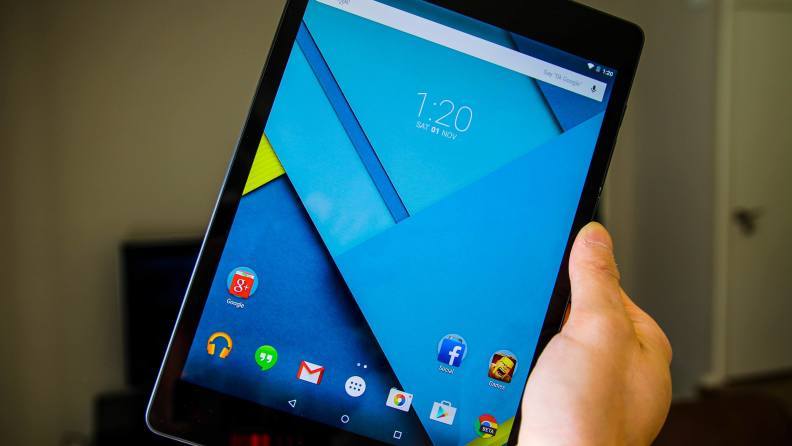
Nexus 9
Nexus 9 is a great Android tablet. It was created by Google and built by HTC. It runs the latest version of Android, and will continue to receive timely software updates for another year or so. The specs is It comes with an 8.9-inch display, a NVIDIA Tegra K1 processor, either 16 or 32GB of on-board storage, a big 6700mAh battery and weighs only 436 grams. Thanks to this device’s specifications, navigating around the device, switching applications, playing games and streaming movies or videos is a breeze. It also has a nice soft touch material on the back  that makes this tablet easy to hold, as well. The device is available in two storage sizes, 16 GB for US$399 and 32 GB for US$479.

Specs of Nexus 9:    
  • 8.9-inch IPS LCD display with 1536 x 2048 resolution, 281ppi     
  • 64-bit 2.3GHz NVIDIA Tegra K1 processor     
  • 2GB of RAM; 16/32GB of on-board storage, no microSD card expansion    
  • 8MP rear camera, 1.6MP front camera     
  • Non-removable 6700mAh battery     
  • Android 6.0.1 Marshmallow     
  • 228.2 x 153.7 x 8mm, 436g
3. Samsung Galaxy Tab S2 8.0
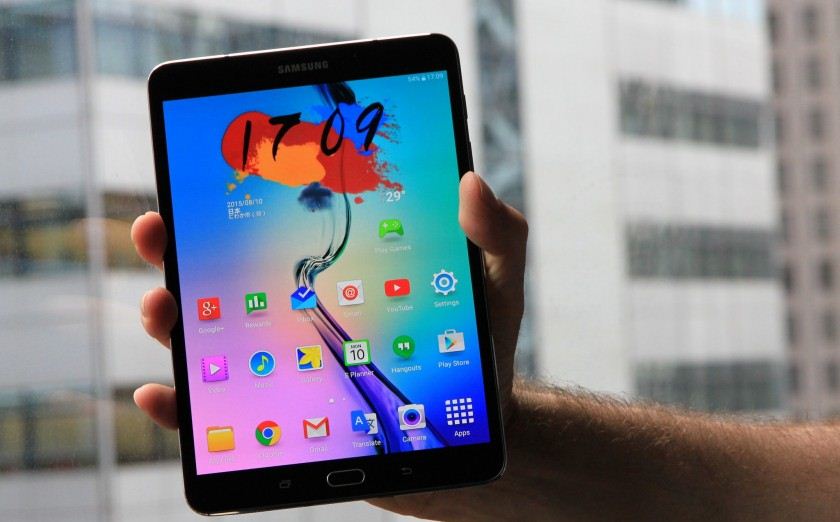
The Galaxy Tab S2 8.0 was announced on 20 July 2015 from a Samsung press release; The device runs Android 5.0.2 Lollipop with Samsung's TouchWiz software suite. The Galaxy Tab S2 8.0 is available in WiFi-only and 4G/LTE & WiFi variants. Storage ranges from 32 GB to 64 GB depending on the model, with a microSDXC card slot for expansion up to 128 GB. The display is a Super AMOLED screen with a resolution of 2048x1536 pixels. It also features a 2.1 MP front-facing camera and a 8.0 MP AF rear-facing camera without LED flash. The hardware home button serves as the fingerprint sensor. Don’t mistake it for the “little guy” in the playground, though. It has plenty of power to keep you going through all your tasks. It may be a bit too similar to an iPad, but it’s still a great Android tablet that many of you will enjoy.

Specs of Samsung Galaxy Tab S2 8.0:    
  • 8.0-inch Super AMOLED display with 1536 x 2048 resolution, 320ppi     
  • 1.9Ghz octa-core Samsung Exynos 5433 processor     
  • 3GB of RAM; 32/64GB of-on board storage, microSD expansion up to 128GB     
  • 8MP rear camera, 2.1MP front camera     
  • Non-removable 4000mAh battery     
  • Android 6.0 Marshmallow     
  • 198.6 x 134.8 x 5.6mm, 265g
4. NVIDIA Shield Tablet K1
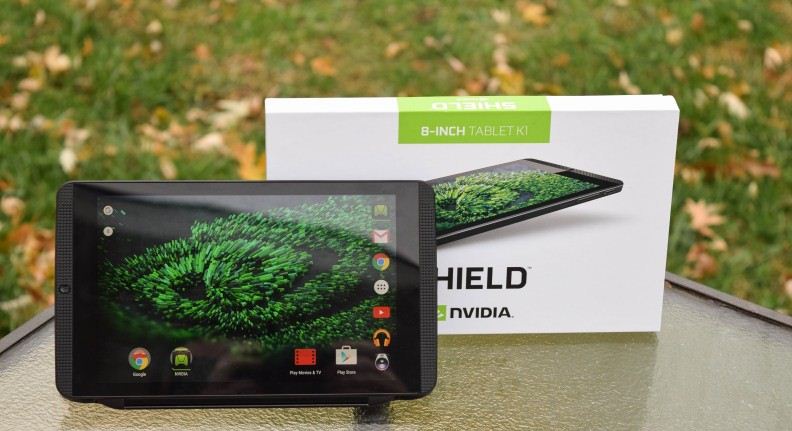
NVIDIA Shield Tablet K1
The Shield Tablet, later relaunched as the Shield Tablet K1, is a gaming tablet, developed by Nvidia and released on July 29, 2014. This is Nvidia's second portable gaming device that uses Android. Compared to the Shield Portable, the controller is not permanently connected to the screen, rather it can be purchased separately. Up to four controllers can be wirelessly connected at the same time. While the Shield tablet features an 8-inch 1920x1200 pixel display, it can output 4K resolution signal to a television via HDMI. NVIDIA removed the stylus holder on the K1, & the stylus is gone. This tablet is now only $200, which makes it not only one of the best Android tablets out there, but also one of the most affordable.

Specs of NVIDIA Shield Tablet K1:     
  • 8.0-inch LCD display with 1920 x 1200 resolution, 283ppi     
  • 2.2GHz quad-core NVIDIA Tegra K1 processor     
  • 2GB of RAM; 16GB of on-board storage, microSD card expansion available     
  • 5MP rear camera, 5MP front camera     
  • Non-removable 19.75WHr battery     
  • Android 6.0 Marshmallow     
  • 221 x 126 x 9.2mm, 390g
5. Sony Xperia Z4 Tablet
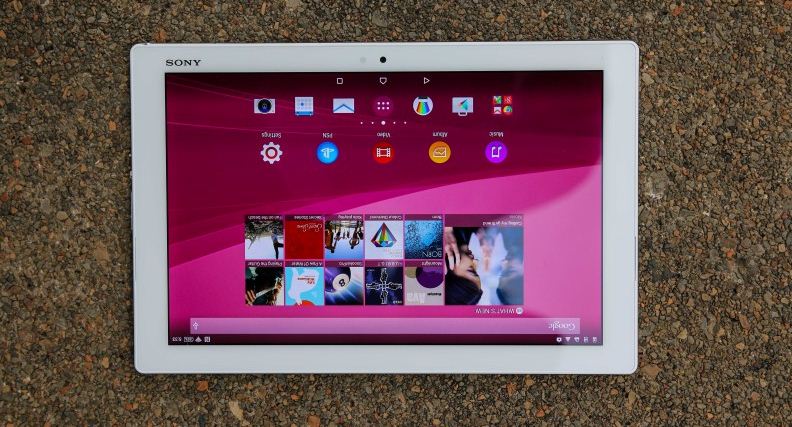
Sony Xperia Z4 Tablet
Sony Xperia Z4 Tablet announced on 2 March 2015, the Xperia Z4 tablet features a 2560x1600 resolution 10.1-inch screen and is water and dustproof with a rating of IP65 and IP68. The tablet is lighter and thinner than its predecessor, weighing at 0.85 pound for the WiFi model and 0.86 pound for the LTE model and is 0.24 inches thick. This is a sleek, thin and very attractive tablet offering from the company. It comes with a Snapdragon 810 processor, 3 gigabytes of RAM, plenty of on-board storage and microSD expansion up to 128 gigabytes. It also comes with a big 6000mAh battery that should be able to last a very long time on just a single charge. It should be noted that while this tablet still runs Android 5.0 Lollipop, Sony has plans to skip the 5.1.1 update and roll out Android 6.0 Marshmallow as soon as it’s ready.

Specs of Sony Xperia Z4 Tablet:     
  • 10.1-inch IPS LCD display with 2560 x 1600 resolution, 299ppi     
  • 2.0GHz octa-core Qualcomm Snapdragon 810 processor     
  • 3GB of RAM; 32GB of on-board storage, microSD expansion up to 128GB     
  • 8.1MP rear camera, 5.1MP front camera     
  • Non-removable 6000mAh battery     
  • Android 6.0 Marshmallow     
  • 254 x 167 x 6.1mm, 389g
6. Dell Venue 8 7000
Dell Venue 8 7000
Dell may not be the first name that comes to mind when talking about Android tablet OEMs, but the company really impressed us with its Venue 8 7000 series tablet. It’s one of the thinnest tablets available right now, measuring just 6.1mm thick. Additional specs include an 8.4-inch OLED display, an Intel Atom Z3580 processor, microSD expansion and two really great cameras for taking quick shots. It’s also running Android 5.1 Lollipop. It’s a tad awkward to hold, but that’s honestly one of the only downsides of this tablet. With an impressive performance and even better battery life, the Dell Venue 8 7000 manages to provide a lot, without the premium price point that would usually be associated with such a package.

Specs of Dell Venue 8 7000:     
  • 8.4-inch OLED display with 1600 x 2560 resolution, 359ppi     
  • 2.3GHz quad-core Intel Atom Z3580 processor     
  • 2GB of RAM; 16GB of on-board storage, microSD expansion up to 512GB     
  • 8MP rear camera, 2MP front camera     
  • Non-removable 5900mAh battery     
  • Android 5.1 Lollipop     
  • 215.9 x 124.2 x 6.1mm, 305g
7. Lenovo Yoga Tab 3 Pro
 Lenovo Yoga Tab 3 Pro
The Lenovo Yoga Tab 3 Pro is unique, much like other Lenovo devices, but this one is special. Lenovo added a full blown projector and stand. It is truly a media powerhouse. The Yoga Tab 3 Pro is a tad expensive, but considering the big display, projector, built-in stand and decent software experience.

Specs of Lenovo Yoga Tab 3 Pro:    
  • 10.1-inch IPS LCD display with 2560 x 1600 resolution, 298ppi     
  • 2.24 GHz quad-core Intel Atom x5-Z8500 processor     
  • 2GB of RAM; 32GB of on-board storage, microSD expansion up to 128GB     
  • 13MP rear camera, 5MP front camera     
  • Non-removable 10200mAh battery     
  • Android 5.1 Lollipop     
  • 247 x 179 x 4.68mm, 667g
8. Asus ZenPad S 8.0 (Z580CA)
Asus ZenPad S 8.0 (Z580CA)
The design of ASUS ZenPad S 8.0 carries modern influences and a simple, clean look that gives it a universal and stylish appeal. These elements are inspired by Zen design philosophy of balancing beauty and strength. ASUS ZenPad S 8.0 is an 8-inch tablet that is only 6.6mm thin, weighs just 298g. ASUS ZenPad S 8.0 is powered by the Intel® Atom™ Z3580 processor (quad-core, 64-bit) and has 4GB RAM.

So which one you gonna use don't forget to mention :)

Tuesday, June 7, 2016

Top 5 Best Android Smart Watch (2016)

Top 5 Best Android Smart Watch
Smart watch is a computerized wristwatch with functionality that is enhanced beyond timekeeping. While early models can perform basic tasks, such as calculations, translations, and game-playing, modern smartwatches are effectively wearable computers. Many run mobile apps, using a mobile operating system. Now days most popular Smart watch's are Android OS driven; Android Wear first announced back in 2014 since then it has become more evolving. In early days, there were only a few options, mainly from Motorola and LG. These days, many handset makers have thrown their weight into Android Wear. There are number of watches available and it increasing dramatically; that makes it hard to keep track of which watches stand out as the best. In order to help you make decision on which watch is right for you, we have narrowed down the list for you. Read on:

Top 5 Best Android Smart Watch (2016)

1. Motorola Moto 360 (2nd Generation)
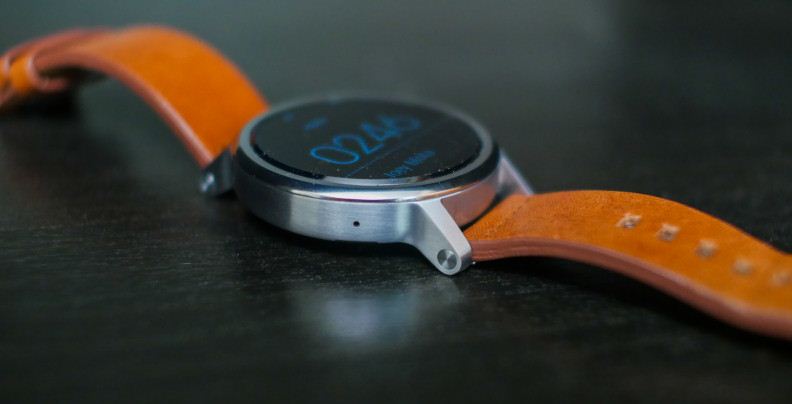
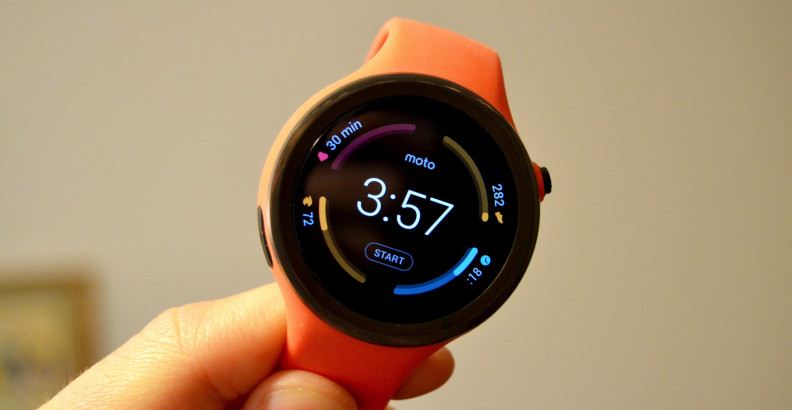
The Moto 360 (2nd gen) is an Android Wear-based smartwatch. It was announced on September 14, 2015 at the IFA. The Motorola Moto 360 (2nd Gen) has a bigger battery than its predecessor, a Snapdragon 400 processor & comes in two different sizes to fit more users wrists. You will be able to customize it through Moto Maker. Overall, the biggest advantages the new Moto 360 brings to the table are the refreshed processing package, a customizable design and the addition of lugs that will make it much easier to swap out watch bands. The Moto 360 (2nd Gen) starts at $299.99, though pricing increases considerably once you start making customization's.

Specs of 42mm variant:     
  • 1.37-inch IPS LCD display with 360 x 325 resolution, 233ppi     
  • 1.2GHz quad-core Qualcomm Snapdragon 400 processor     
  • 512MB of RAM, 4GB of on-board storage     
  • 300mAh battery     
  • 42.0 x 42.0 x 11.4mm     
  • IP67 dust and water resistance  
Specs 46mm variant:     
  • 1.56-inch IPS LCD display with 360 x 330 resolution, 263ppi     
  • 1.2GHz quad-core Qualcomm Snapdragon 400 processor     
  • 512MB of RAM; 4GB of on-board storage     
  • 400mAh battery     
  • 46.0 x 46.0 x 11.4mm    
  • IP67 dust and water resistance
2. Moto 360 Sport
2. Moto 360 Sport
Moto 360 Sport has basically the same internal specifications as The Moto 360 (2nd gen), plus GPS tracking capabilities. The battery on this device does suffer a bit with the GPS turned on, but that can easily be forgiven when taking into account the watch’s other great features. It has a killer AnyLight Hybrid display that makes it super easy to see outdoors. This is the go-to Android Wear option if you need something to track your exercises. As of right now it only supports run tracking, but Motorola says more exercises will be added to the watch in the future. The Moto 360 Sport starts at $299.99.

Specs of Moto 360 Sport:
  • 1.37-inch AnyLight Hybrid Display with 360 x 325 resolution, 263ppi     
  • 1.2GHz quad-core Qualcomm Snapdragon 400 processor     
  • 512MB of RAM; 4GB of on-board storage     
  • 300mAh battery     
  • 45 x 45 x 11.5mm, 54g     
  • IP67 dust and water resistance.
3. Huawei Watch
3. Huawei Watch
The Huawei Watch is an Android Wear-based smartwatch developed by Huawei. It was announced in 2015 Mobile World Congress on March 1, 2015. The Huawei Watch is based on the circular design of traditional watches, supporting a 42 mm AMOLED screen. The screen's resolution is 400x400 pixels and 285.7 ppi. The case is 316L stainless steel, covered with sapphire crystal glass on front and available in six finishes: Black Leather, Steel Link Bracelet, Stainless Steel Mesh, Black-plated Link Bracelet, Alligator-pressed Brown Leather and Rose Gold-plated Link Bracelet. The watch pre-installed Android Wear operating system and it works with iOS (8.2 and later) and Android (4.3 and later) devices. pricing is starting at $350.

Specs of Huawei Watch:
  • 1.4-inch AMOLED display with 400 x 400 resolution, 286ppi     
  • 1.2GHz quad-core Qualcomm Snapdragon 400 processor     
  • 512MB of RAM; 4GB of on-board storage     
  • 300mAh battery     
  • 42.0 x 42.0 x 11.3mm     
  • IP67 dust and water resistance 
4. LG Watch Urbane
4. LG Watch Urbane
LG Watch Urbane is an Android Wear-based that was released on April 27, 2015. It comes in either gold or silver, with 22mm swappable wriststraps and the watch has IP67 dust and water resistance. Powered by Qualcomm Snapdragon 400 SoC, 512MB of RAM and 4GB of eMMC storage. The OLED display is a POLED variant, with an equivalent resolution to a square display of 320x320, with capacities touch input. The watch has 9 axis movement sensors (gyro, accelerometer, compass), barometer, and heart rate sensor. The watch has a dual microphones (for noise reduction) which are used with Google Now's speech recognition. LG Watch Urbane costs $250 and if you’re looking for a more luxurious version a 23k gold version called the Watch Urbane Luxe cost you about $1,200.

Specs of LG Watch Urbane:    
  • 1.3-inch P-OLED display with 320 x 320 resolution, 245ppi     
  • 1.2GHz quad-core Qualcomm Snapdragon 400 processor     
  • 512MB of RAM; 4GB of on-board storage     
  • 410mAh battery     
  • 45.5 x 52.2 x 10.9mm     
  • IP67 dust and water resistance
5. ASUS ZenWatch 2
5. ASUS ZenWatch 2
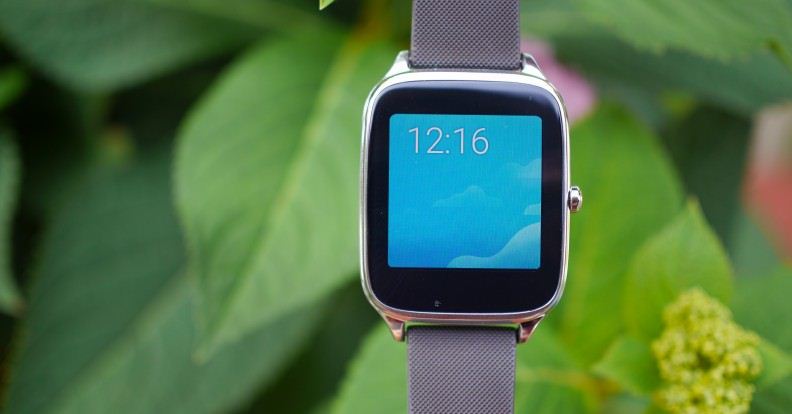
Original ASUS ZenWatch was one of the best Android Wear devices on the market for some time & now the company has brought a new model to market called ZenWatch 2. ASUS is going for the entry-level pricing market with the ZenWatch 2. The ZenWatch 2 comes with a square display, It has an AMOLED display that will help save precious battery life, a Snapdragon 400 processor, more than enough on-board storage for applications and music, as well as a 400mAh battery. You can even choose between a larger 1.63-inch model and a 1.45-inch model if you happen to have smaller wrists. ASUS ZenWatch 2 from Amazon starting at only $129.99.

Specs WI501Q (22mm) model:      
  • 1.63-inch AMOLED display with 320 x 320 resolution, 278ppi     
  • 1.2GHz quad-core Qualcomm Snapdragon 400 processor     
  • 512MB of RAM; 4GB of on-board storage     
  • 400mAh battery     
  • 49.6 x 40.7 x 10.9mm     
  • IP67 dust and water resistance  
WI502Q (18mm) model:      
  • 1.45-inch AMOLED display with 280 x 280 resolution, 273ppi     
  • 1.2GHz quad-core Qualcomm Snapdragon 400 processor     
  • 512MB of RAM; 4GB of on-board storage     
  • 300mAh battery     
  • 45.2 x 37.2 x 11.8mm     
  • IP67 dust and water resistance
So which one you gonna use; don't forget to mention :)

10 Best Alternatives to Samsung Galaxy Gear Fit

10 Best Alternatives to Samsung Galaxy Gear Fit
Samsung Galaxy Gear Fit is an activity tracker which provides its wearers personalized and real time information about their progress and results of their daily work out by deploying its own state of the art device’s optical heart rate sensor. Samsung Galaxy Gear Fit will make it easy for you to track and monitor all of your activities from sleeping to eating and working to resting throughout the day and prepared for any fitness goal or adventure by simply using the dust and waterproof faintness tracker. As it is fully compatible with all devices of Samsung and even the other smartphones, you can also get the activity reports in your smart devices as well. Regarding the fitness tracking; there are still many additional features that is hard to found in other fitness trackers. These features are in the shape of getting notification of SMS, emails, calls and app in the Samsung Galaxy Gear Fit. Here below Top 10 Best Alternatives to Samsung Galaxy Gear Fit listed; Read on:

10 Best Alternatives to Samsung Galaxy Gear Fit

1. Nike+ FuelBand 
Nike+ FuelBand
Nike+ FuelBand is the product of Nike Inc. It is an activity tracker, which is used with Apple iPhone, iPad or Android device. This wrist band enables the wearers to track their daily physical activities such as steps were taken, calories burned, energy in-taken, etc. Moreover, a user can also set his own fitness goals and can monitor their progression as well.

2. Garmin Vivofit 2 
Garmin Vivofit 2
Garmin Vivofit 2 is highly strict activity and fitness tracker that motivate you to get up and get moving. No matter what is your routine life, count your all daily activities? It enables you to keep in touch with all your health matters regarding calories burned and intake, the performance of goals set, heart rate, water resistant, sleep monitoring and many more. In addition to it used with tablets, Mac, and iPhone.

3. Fitbit 
Fitbit
Fitbit will keep your health safe and remain active and attractive is the concern of every human being. A number of activity tracker products are available in the market that will enable you to keep yourself update about your weight, calorie intake and burn and remain healthy and safe.

4. Polar Loop 2 
Polar Loop 2
Polar Loop 2 is a digital activity tracker for those who wants to track their activity 24/7 and are interested in to reach activity goals via smart guidance. This waterproof activity tracker can be easily used while swimming. Apart from showing the results of daily activities, it also gives feedback about your daily, weekly and monthly activity.

5. Mi Fit 
Mi Fit
Mi Fit is a band to monitor your health and fitness level on daily basis. Mi Fit lets its wearers to monitor the activities that they carry out the entire day. They can in real-time track their activity levels, walking distance, and calculates the quantity of calories taken and burned and all are on-demand. Mi Fit is a way to easily achieve the exercise and fitness targets that you have taken.

6. Microsoft Band 
Microsoft Band
Microsoft Band is a health tracking and monitoring application by the Microsoft by using which the person of any age can achieve his wellness and fitness goals. Microsoft Band is for monitoring and tracking all type of issues and works related to health either it is about physical or mental there is no limits and you can do what want to do, in fact,  what you can do.

7. Moov Now 
Moov Now
Moov Now is a multipurpose and multi sport fitness and health tracking device by using which they wearers can enjoy the best health and fitness. The elegant and stylish fitness devices of Moov Now has been specially designed for the purpose of tracking your health while running, cycling, biking, golfing, swimming, cardio boxing, and body-weight workouts.

8. Misfit Flash 
Misfit Flash
Misfit Flash is a superb and economical sport and sleep monitoring device that will measure your activities and sleeps on the daily basis. Misfit Flash can be easily synchronized with the almost all smartphones and then the wearers can track his activities from the screen of their smartphones as well. By using this, you can track all kind of mental and health-related issues and activities.

9. Razer Nabu X 

Razer Nabu X
Razer Nabu X is a social featured based health and fitness and tracking application where there is no system of getting the performance report on the screen; instead, it will be available on the smartphone that are synchronized with the Razer Nabu X. That means to wear the Razer Nabu X on your wrist like a watch the performance of your daily health and mental positions from your smartphone.

10. Jaybird REIGN 
Jaybird REIGN Fitness Tracker
Jaybird REIGN Fitness Tracker is an advanced and highly functional activity tracker that allow you to known how to get you to run maximum and control your health issues. By using this health tracker band, you can get the most of your active life, dig deep and come out swinging and do whatever games you want to do without even caring for any issues or worrying about too much about them.

So which one you gonna use don't forget to mention :)
Popular Posts

Recent Posts

YouAreHere

Unordered List

Text Widget

Powered by Blogger.